Claims

By the time a claim arrives, you already know a lot about the person filing it.

ForMotiv reads how a loss is reported, not just what is reported, and connects it to everything the claimant did from quote to FNOL. Fast-track the honest majority, stop takeover before payout and give SIU the session evidence to act on the rest.

At FNOLbehavior behind the loss report

Before payoutcatch account takeover

For SIUkeystroke-level evidence

FNOL session replay · sample
Date of loss
Estimated damage
What happened?
    Session in progress…

    Quote-to-claim record

    Give SIU and claims teams the full story, from the first quote to first notice of loss

    1. Quote behaviorHigh-risk behavior on rating answers before the price droppedSignal
    2. Quote behaviorBound on the cheapest quote, minimum limitsContext
    3. Policy changesCoverage added online, weeks after bindSignal
    4. Account activityHigh-risk behavior on the account after loginSignal
    5. FNOL sessionSuspicious behavior on the loss detailsSignal
    6. FNOL sessionThe full intake session, attached to the claimContext
    Recommended handling

    Fast-trackStandardReviewSIU

      SIU & Forensics

      What does an investigator actually get?

      The ForMotiv Console is the offline tool fraud, SIU, underwriting and product teams use to work sessions after the fact. ForMotiv Forensics adds the full record: every interaction across the policy, timestamped and stored.

      • One timeline, from policy opening to claimApplication, portal and claim sessions in order. All interactions timestamped and stored.
      • The edits, not just the final answerSee that the date of loss was 03/12 before it became 03/04.
      • Links to every related sessionOther policies and claims sharing a device, network or payment method.
      • Signals with reasonsPlain-language explanations an investigator can put in a case file.
      • Inside the Console →ForMotiv Forensics →Fraud & SIU team →

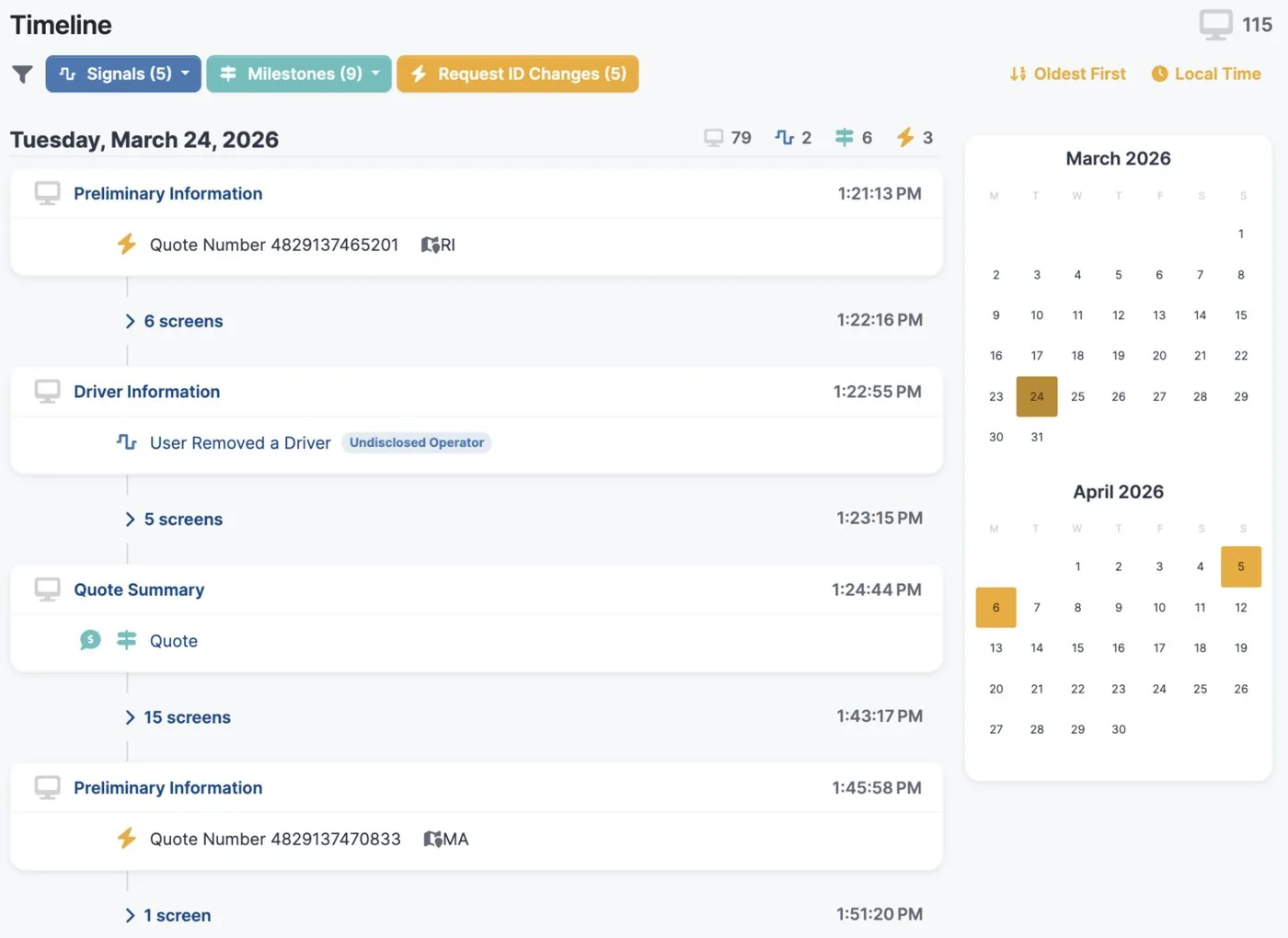
      ForMotiv Console · Session timeline
      ForMotiv Console session timeline
      Session timeline: the claim as it was entered, step by step.

      Every interaction on the policy, in one timelineIllustrative

      Policy opening
      Portal
      Claim
      Policy opening Day 0 · 9:14 AM Quote & application Direct web. Applied, quoted and bound.
      Portal Day 2 · 7:41 PM Portal registration Account created for the new policy.
      Portal Day 24 · 11:03 PM Login · payment method Billing details updated.
      Portal Day 57 · 1:22 AM Login · contact details Email and phone changed.
      Claim Day 61 · 6:48 AM Claim filed Web FNOL. Loss reported and payout details entered.
      Claim Day 63 · 2:15 PM Claim follow-up Documents uploaded through the portal.

      All interactions timestamped and stored, so an investigator sees the claim in the context of everything that came before it.

      Flagged for risky buying behaviorAll new policies

      Early-term claims

      Some early claims were predictable the day the policy was bought.

      The way someone buys a policy often predicts how soon they claim on it. Policies flagged for risky buying behavior file early claims far more often than the rest of the book.

      Rating answers edited until the price dropsMileage, garaging ZIP, drivers or prior claims changed after a premium is shown.

      Coverage raised right before bind or right afterLimits or new coverage added when a loss may already have happened.

      Quote restarted with small changesThe same applicant probing for the answer that gets them through.

      Account takeover before payout

      Takeover usually shows up right before the money moves.

      An attacker doesn’t need to invent a loss. Through social engineering schemes, they get the policyholder’s credentials, or the policyholder themselves, to redirect the payout. Passwords, one-time codes and knowledge checks can all pass. Behavior is what doesn’t match.

      Phishing

      Credentials harvested by a fake carrier message

      An email or text that looks like it came from the carrier collects the login. The attacker signs in with the real password.

      What ForMotiv seesA login from a device and network the policyholder has never used, then a direct path to payout details.

      Impersonation

      Posing as the policyholder to reset access

      The attacker contacts support as the policyholder to reset the password or change the email on file.

      What ForMotiv seesThe next portal session doesn’t behave like any session before it on the account.

      SIM swap & MFA interception

      One-time codes sent to the attacker

      The policyholder’s number is moved to the attacker’s phone, so multi-factor checks pass.

      What ForMotiv seesAuthentication succeeds, but behavior after login is unfamiliar with the account and moves straight to money.

      Coached policyholder

      A real policyholder, talked through by a scammer

      A fake adjuster or support agent walks the policyholder through changing payout details over the phone.

      What ForMotiv seesThe right person with the wrong intent: dictated pacing, pasted bank details and unusual navigation.
      Hold the payout change and step up verification before the money moves.

      Fast-track

      Most claimants are honest. They should get paid faster.

      When every claim waits in the same queue, genuine customers pay for the few who aren’t. Behavioral context lets you clear the clean claims straight through and spend adjuster and SIU time where the signals are.

        Every channel

        Claims don’t only arrive through a web form

        Claimants report online, in chat, on the phone and through their agents. The behavioral record follows them, so whoever takes the claim sees what the claimant just did.

        Group benefits & disability

        The same signals work on disability and group benefits claims

        A top U.S. group benefits carrier uses ForMotiv on employee registration and claims, where fraud comes from two directions.

        First-party exaggeration

        Edits on condition, dates and earnings

        Answers that change between claim and follow-up

        Third-party rings

        Compromised employee accounts registered and used to file in quick succession

        Shared devices across unrelated employees

        FAQ

        Frequently asked questions

        How does ForMotiv help insurance claims teams?

        ForMotiv brings application and account behavior into the claims process and reads behavior in the claim itself, so claims teams can fast-track genuine claims and send risky ones for review before payment.

        What claims use cases does ForMotiv cover?

        Claims use cases include FNOL fraud, early claims shortly after bind, account takeover before a payout, group benefits claims fraud, and SIU and Forensics investigations.

        What are early claims?

        Early claims are claims filed shortly after a policy is bound. ForMotiv connects how the policy was bought to the claim that follows, which helps identify policies bought with a loss already in mind.

        How does ForMotiv detect account takeover before a claim payout?

        ForMotiv flags high-risk behavior after login and ahead of a payout, using behavioral data captured in the session and the rest of the policy's record, so carriers can verify before money moves.

        Does ForMotiv slow down genuine claims?

        No. Because most claimants behave as expected, carriers can use ForMotiv to move genuine claims faster and focus reviews where the behavior warrants it.

        Your applications already know more than they say.

        Bring one journey and one goal. We’ll show you the behavioral signals behind it, the decisions they can drive, and how ForMotiv fits into your stack.

        01
        Pick the use case

        Leakage, fraud, conversion or agent oversight, on the line and channel you care about most.

        02
        See it on a real flow

        A walkthrough of the signals, features and scores for journeys like yours.

        03
        Map the integration

        Where the tag goes, what the API returns and which systems act on it.